Imagine this.
It's the middle of summer. The phones are ringing nonstop. Your dispatchers are moving jobs around, technicians are rushing from one service call to the next, and new leads are pouring into HubSpot.
Everything is moving fast. Then someone notices a problem.
A customer's address in HubSpot doesn't match the address in ServiceTitan. Another customer appears twice. A job status hasn't updated. A marketing campaign is showing leads, but nobody can confidently connect those leads to the revenue coming through the door.
Nothing looks broken at first.
But underneath the surface, the data is starting to fight itself.
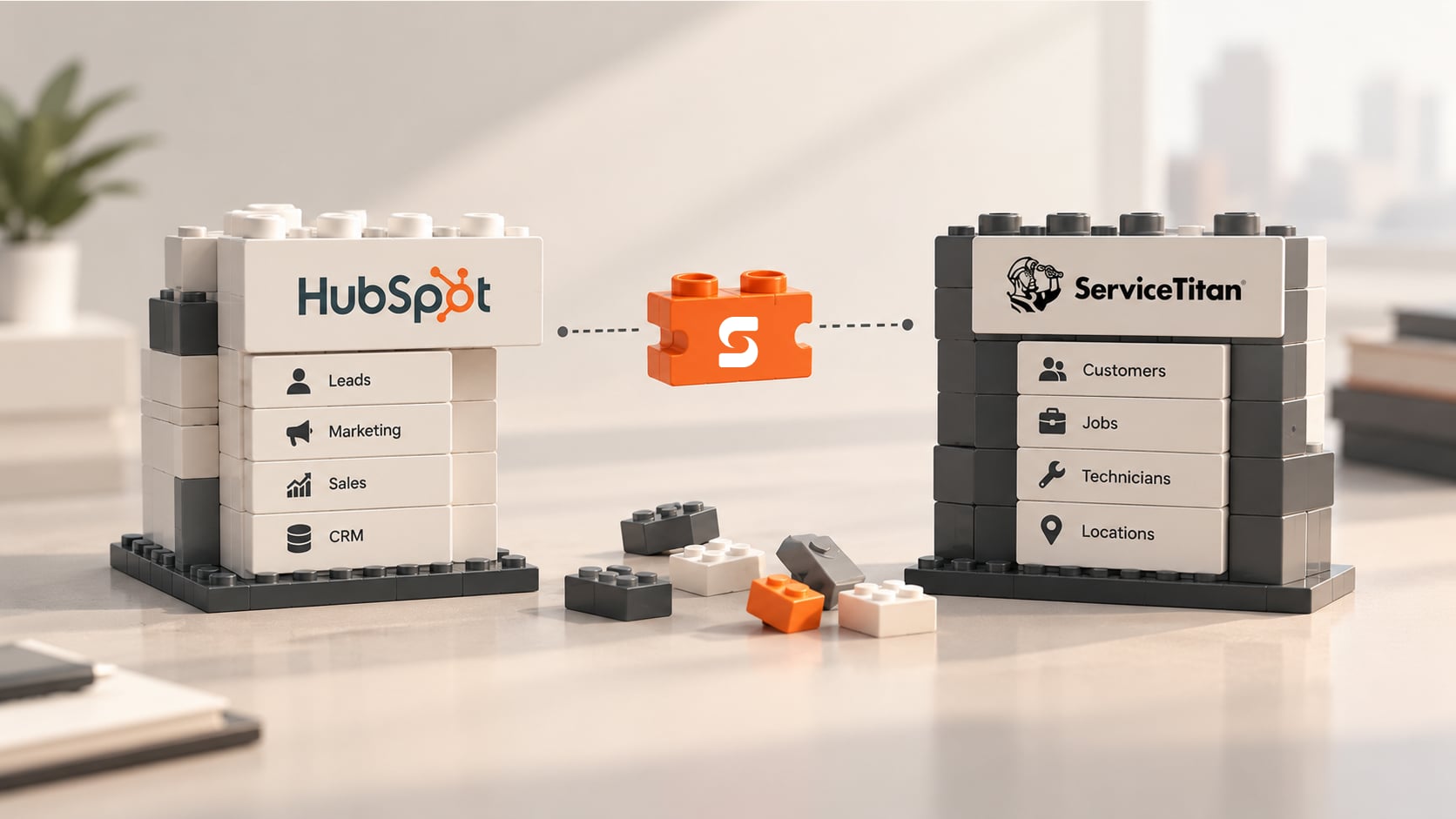
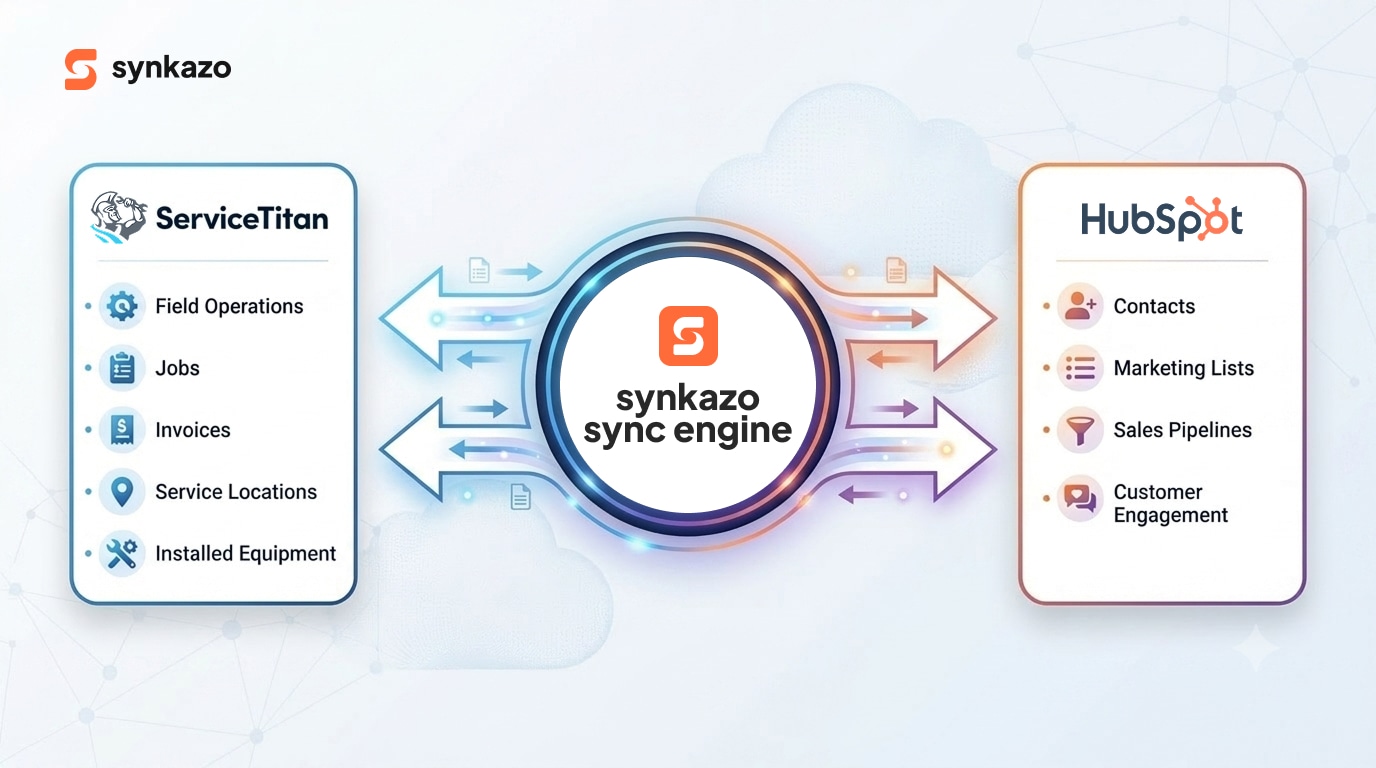
For growing HVAC, plumbing, electrical, and other trades businesses, this can become a very expensive problem. ServiceTitan and HubSpot are both powerful platforms, but they were built for different purposes. ServiceTitan is deeply connected to the day-to-day reality of running a service business — customers, service locations, jobs, technicians, estimates, equipment, memberships, and operational details. HubSpot, on the other hand, is built around contacts, marketing activity, sales pipelines, and customer engagement.
Connecting them sounds simple.
It isn't.
The real challenge isn't simply getting two APIs to talk to each other. It is making sure they understand what the data means, who owns it, where it belongs, and what should happen when something doesn't match.
That is where field mapping comes in.
If you are evaluating a managed connection, the synkazo ServiceTitan connector shows the configurable object directions, match keys, and setup requirements alongside this field-mapping discussion.
The moment a simple sync becomes a serious business system
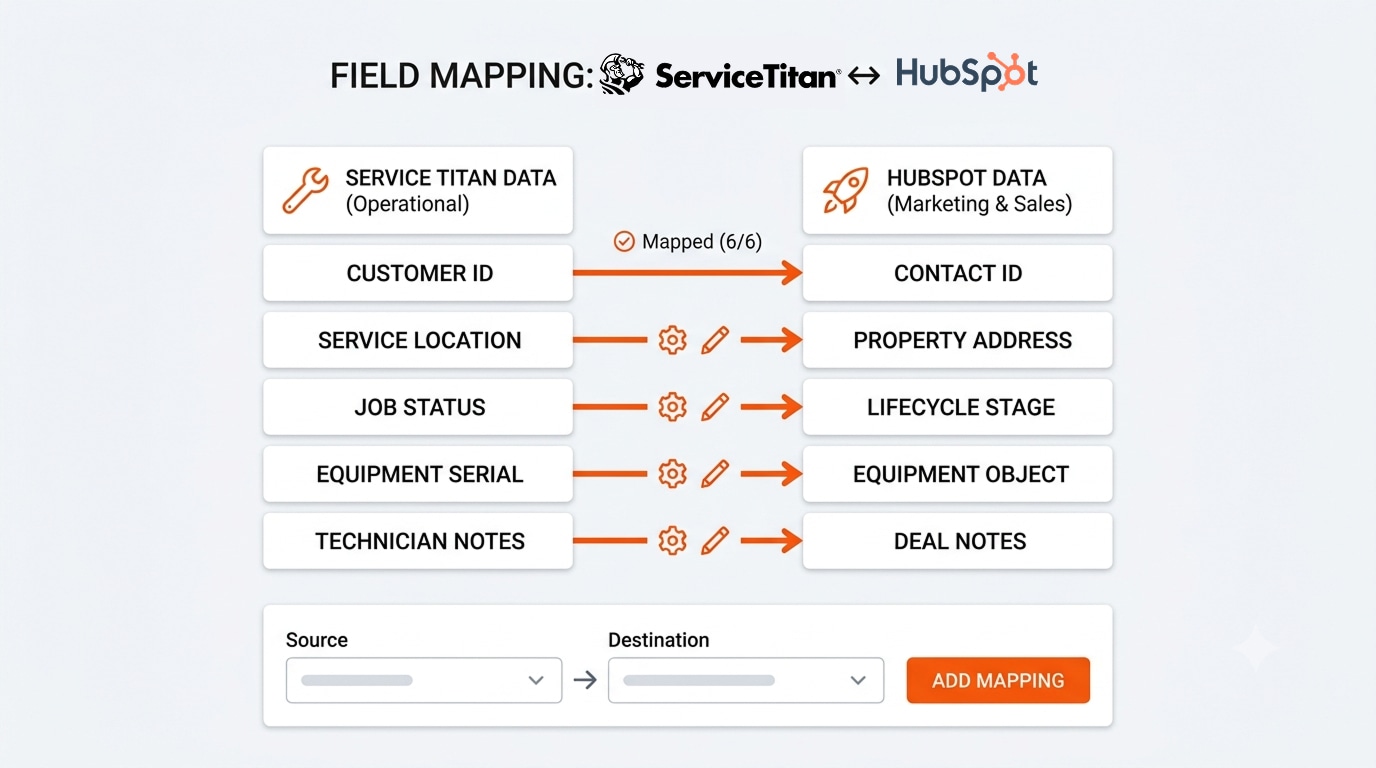
Think of field mapping as a translator.
ServiceTitan might call something name. HubSpot might call it Company name. ServiceTitan may have a field called isCustomer, while HubSpot stores the same business concept as Customer Is Active.
On the surface, these are just fields.
In the real world, they represent business decisions.
A good mapping system creates a clear relationship between the source field and the destination field. In a typical Companies-to-Companies sync, for example, you might map ServiceTitan id to a HubSpot customer ID, description to Description, name to Company name, website to Website URL, defaultInvoiceTerms to Default Invoice Terms, and isCustomer to Customer Is Active.
The mapping reference follows this same kind of source-to-destination structure.
The screenshot of the mapping experience makes this idea tangible. Instead of asking a business owner or operations manager to understand API payloads and backend code, the interface shows the relationship visually: source on one side, destination on the other, with options for matching, rules, editing, and removing mappings.
Even better, the system can tell the user when the job is done: "6 of 6 fields ready" and "All mapped."
That may look like a small UX detail.
It isn't.
When you're dealing with business-critical data, confidence is part of the product. Instead of wondering, "Did we map everything correctly?" the user can see the answer right in front of them.
Map fields, but don't forget the meaning behind them
Here is where things get interesting.
Two fields can have similar names and still behave very differently.
Take isCustomer.
If ServiceTitan says a company is no longer a customer, what should happen in HubSpot? Should the company be marked inactive? Should it move into another lifecycle stage? Should a workflow stop sending certain communications? Should the record remain untouched?
The field mapping itself is only the beginning.
The business rule behind the field is what really matters.
That is why a modern mapping experience should allow rules to sit alongside individual field mappings. A user shouldn't have to build a custom application every time one field needs special treatment.
The best integrations make complicated decisions feel simple — powerful enough for complex businesses, simple enough for the person sitting at a desk who just wants the sync to work.
When two systems disagree, who gets the final word?
This is one of the most important questions in any integration.
Suppose a dispatcher corrects a customer's billing address in ServiceTitan. A few minutes later, HubSpot sends an older address back.
Which address should win?
If the answer is "whichever system updates last," you don't have synchronization. You have a data tug-of-war.
A better approach is to establish a system of record for each important field. Operational information such as service locations, billing details, job status, technician findings, and equipment information should generally be governed by ServiceTitan. Marketing and sales information such as lead sources, lifecycle stages, form submissions, and marketing communication consent can be governed by HubSpot.
The underlying reference makes the same distinction: ServiceTitan should generally own operational truth, while HubSpot should own marketing and sales information.
The goal is not to make one platform the boss of everything. The goal is to make sure every important piece of data has a clear owner.
Once that rule is established, bidirectional synchronization becomes much safer. Because without ownership, every sync is a potential overwrite.
The tricky part: customers aren't always one-to-one
Real businesses don't fit neatly into database boxes.
A homeowner might have one primary contact and one service location. Easy.
But now imagine a property management company. One company might manage twenty, fifty, or even hundreds of properties. In ServiceTitan, those physical locations need to remain distinct because each location has its own service history. In HubSpot, the business may be represented as a single company with relationships to those locations.
That is a one-to-many relationship.
And then there are businesses running multiple ServiceTitan business units — HVAC, plumbing, electrical, indoor air quality, and more — that need to be represented cleanly in HubSpot for reporting and segmentation.
- This is why simply connecting "Company" to "Company" isn't enough.
- The integration needs to understand the relationships behind the records.
- The goal isn't to move data.
- The goal is to preserve context.
The duplicate-record problem nobody notices until it hurts
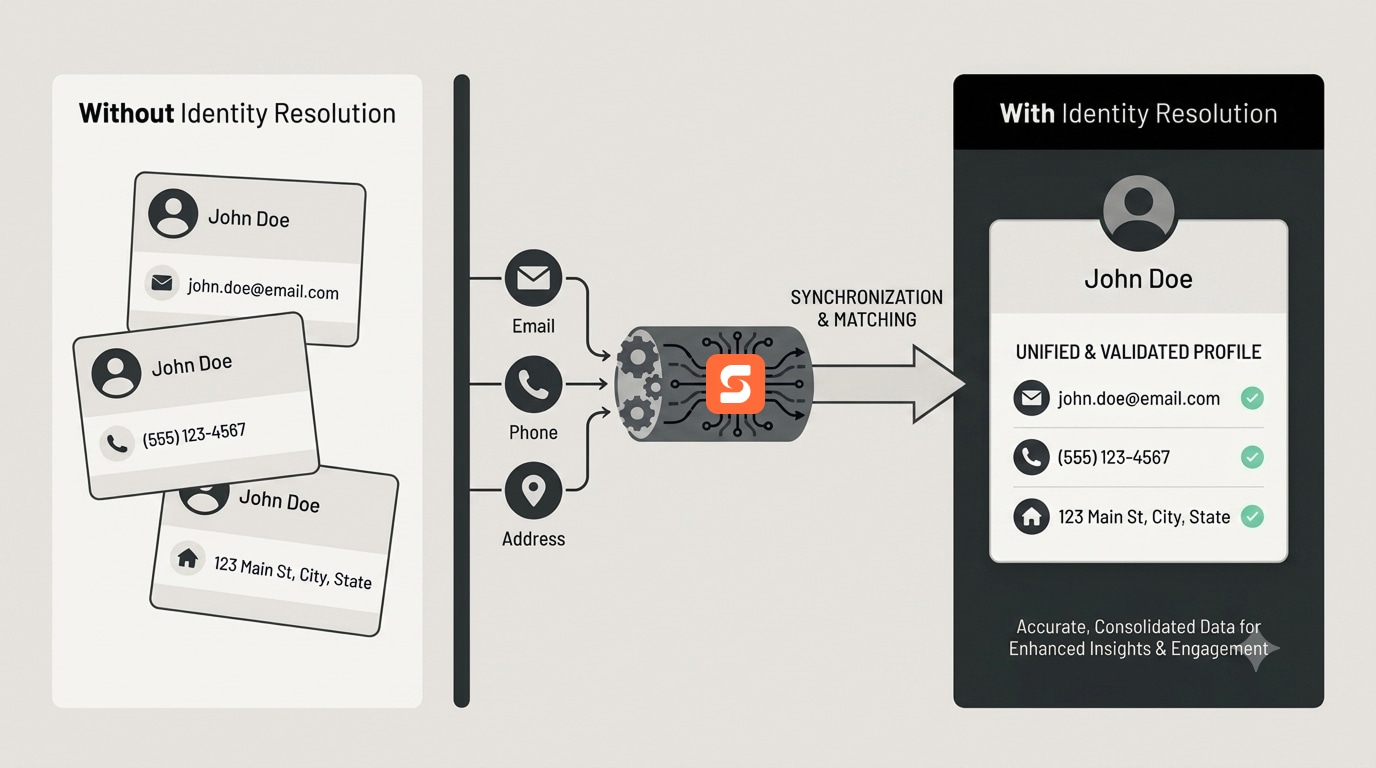
Here's a scenario that happens more easily than most teams expect.
A property manager calls to schedule a repair for a tenant. The phone number belongs to the property manager, but the service address belongs to the tenant. Maybe the email belongs to an office administrator.
A basic integration looks at the incoming information and thinks, "New customer."
And just like that, another record is born. One customer becomes two. Then three. Then the marketing team starts wondering why the CRM says there are more customers than the business actually has.
This is where identity resolution becomes critical.
A reliable sync shouldn't blindly create a record because one field doesn't match. It should be able to consider multiple signals — such as IDs, email addresses, phone numbers, and physical addresses — before deciding whether a record is new or already exists.
The reference material highlights this exact challenge, noting that identity resolution is essential for preventing duplicate customer records.
Because a duplicate record isn't just an annoying database problem. It can mean duplicated marketing messages, inaccurate reporting, confused customer-service conversations, and revenue attribution that simply doesn't add up.
The summer heatwave test
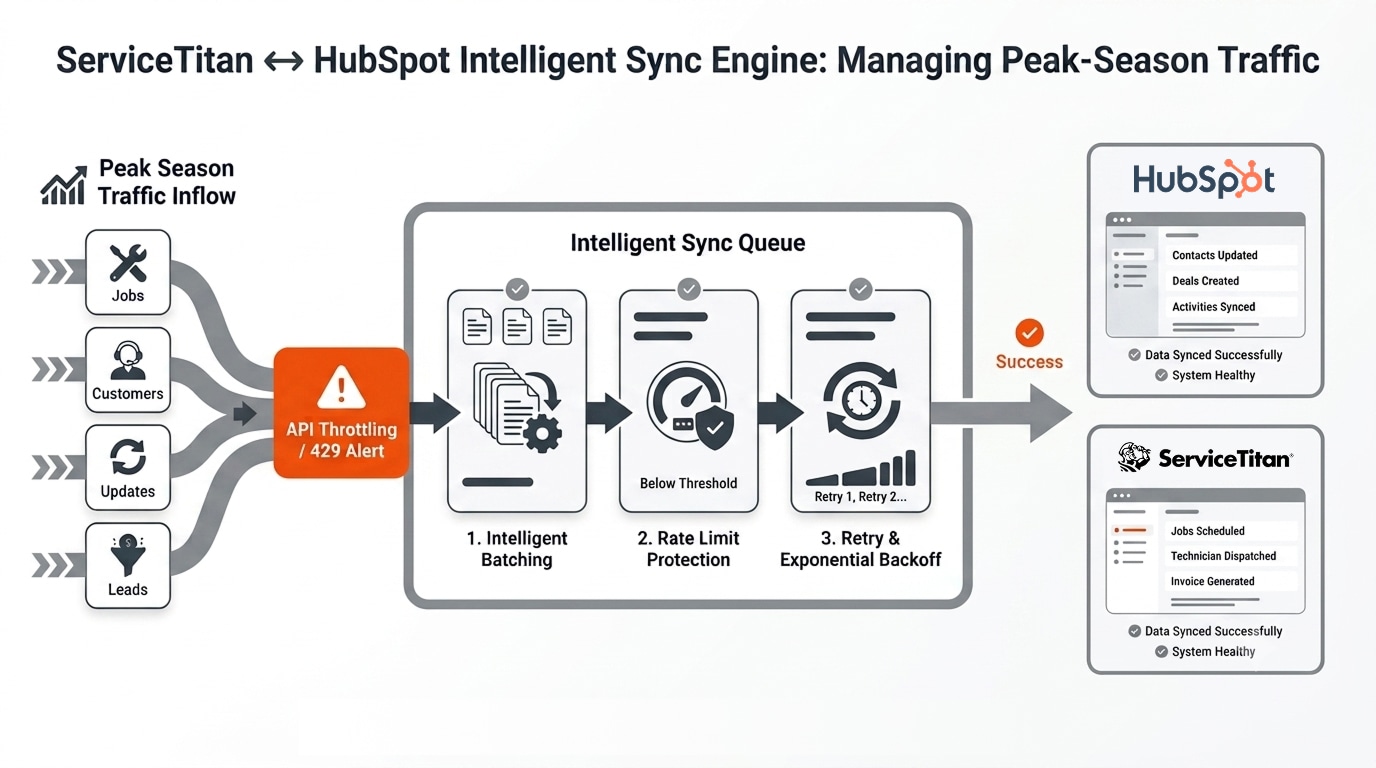
Now let's turn up the pressure.
It's a 100-degree day. Air-conditioning calls are flooding in. Your technicians are booked solid. New jobs are being created constantly, and every update is generating more activity across your systems.
This is when a fragile integration reveals itself.
A simple "trigger → API call → update record" approach can work beautifully when volume is low.
Until it doesn't.
When API traffic spikes, rate limits can become a serious bottleneck. The source material notes a ServiceTitan developer API limit of 60 requests per second per app per tenant. Once the system starts receiving throttling responses, a naïve integration can lose transactions unless it has proper queue management, retry logic, and exponential backoff.
In other words, the busiest day of the year is exactly when your integration needs to be at its best. A serious sync engine needs to expect traffic spikes rather than be surprised by them.
That means queues. Batching. Retries. Backoff. Monitoring.
The boring stuff that becomes incredibly important when the phones won't stop ringing.
The field mapping screen is more than a settings page
At first glance, a field-mapping screen can look like just another admin page.
But it is actually the control center of the integration.
A well-designed experience can show exactly how many fields are mapped, whether anything is missing, which fields are read-only, how records are matched, and where additional rules can be applied.
The product example shows this clearly. The interface gives the user a direct "Source → Destination" relationship, displays the field type, provides a matching strategy, and gives users controls to add rules or edit individual mappings.
There is also a search option for finding fields quickly, along with an Auto-map action that can speed up the initial configuration.
These details matter because integrations are rarely "set it and forget it."
- Businesses change.
- Fields change.
- Processes change.
- New custom properties get added.
- The mapping layer needs to evolve with the business.
Standard fields are only the beginning
A trades business has much more valuable data than just company names and websites.
A technician might discover a cracked heat exchanger. A customer might have a premium service membership. An HVAC unit might have a specific brand, serial number, model, and installation age. An estimate might contain line-item pricing and configuration details. A completed job might tell you exactly what happened at a property.
That information can be incredibly valuable inside HubSpot. If it stays locked away in ServiceTitan, the marketing and sales teams are working with only half the story.
This is why custom fields and custom objects matter. The integration should be able to carry meaningful operational information into the CRM instead of reducing a complex service relationship to a name and an email address. The reference specifically calls out custom technician notes and installed equipment as important data that can be mapped into HubSpot.
When mapping becomes a growth engine
This is where the story gets bigger.
At the beginning, field mapping sounds like a technical task.
"Match this field to that field" → "Turn on the sync" → "Done"
But the real payoff comes later.
When ServiceTitan and HubSpot share clean, reliable data, marketing can see what happened after a lead came in. Sales can understand the customer's service history. Customer-service teams can work from better information. Business owners can start connecting marketing activity to actual operational revenue.
The question changes:
From: "How many leads did we generate?"
To: "Which marketing activities generated customers, jobs, and revenue?"
That is a much more powerful question. And it is only possible when the data underneath it can be trusted.
Where synkazo fits into the picture
This is the problem a productized synchronization platform like synkazo is designed to solve.
Instead of turning every ServiceTitan-to-HubSpot connection into an eight-week custom development project, the experience can be packaged into a guided workflow where users configure the objects, mappings, rules, matching strategy, schedule, and synchronization behavior from one place.
The reference positions synkazo around state-maintaining synchronization, trade-specific schema mapping, and rate-limit protection rather than simple trigger-based automation.
The goal is to take the complexity that normally lives inside custom code and bring the useful parts to the surface through a clear product experience.
A user can choose Companies → Companies, review the fields, select how records should be matched, use Auto-map to accelerate configuration, add rules where necessary, and see when all fields are ready.
Then comes the moment everyone wants to see:
Start Sync.
- No giant spreadsheet.
- No mysterious backend script.
- No waiting for a developer to change one field mapping.
- Just a clear path from configuration to synchronization.
- That is what makes productized integration different.
- The technology can be sophisticated underneath.
- The experience shouldn't have to be.
Before you start the sync
Before putting an integration into production, make sure these questions have clear answers:
- Identity: How do we know two records represent the same customer?
- Ownership: Which system controls each important field (source of truth)?
- Mapping: Are all required and custom fields connected correctly?
- Rules: What happens when data is missing or doesn't match?
- Reliability: Can the system handle duplicates, errors, and peak API traffic?
But answering them before the first sync is far more exciting than discovering the answers after thousands of records have already been changed.
The final goal isn't synchronization. It's trust.
- The best integrations eventually disappear into the background.
- A dispatcher updates a customer in ServiceTitan and doesn't have to worry about what happens next.
- A marketer sees reliable customer information in HubSpot.
- A sales rep can understand what is happening with a job.
- A business owner can look at a report and actually trust the numbers.
- That is the real promise of ServiceTitan ↔ HubSpot integration.
- Not simply moving data from Point A to Point B.
- Not simply checking a box that says "Connected."
- It is creating a shared understanding between two systems that were never designed to speak the same language.
- And when that happens, something important changes.
- Your team stops managing the integration.
The integration starts managing the data.
That's the difference between a connection that technically works and a system that actually helps the business grow. Map it right. Sync it safely. Let the business move faster.
We’ll connect a sandbox and map one of your real objects on the call. Thirty minutes, no slide deck.
Request a demo